BatchLeads reviews: a comprehensive review of BatchLeads features
BatchLeads reviews describe a property intelligence platform that combines list building, skip tracing, a basic CRM and outreach tools in one workflow.
Fans of the platform point to speed and convenience, and critics point to stale records, tight refund terms and a thin CRM. Customers who come to ForeclosuresDaily.com from other lead services often tell us those tools put polished software ahead of fresh data, which left them working outdated records. Below is a practical way to test BatchLeads before you pay for a full plan.





















Hear From Our Customers
Click a profile to watch their video or read their story.






Is BatchLeads a practical lead generation tool? What reviews say
BatchLeads can be practical for real estate lead generation when your workflow involves building targeted property lists, skip-tracing owners, stacking lists, and launching outreach without constantly switching between separate tools.
Its official materials describe property search, map search, owner and investor information, MLS-related data, hundreds of filters, AI deal support, and contact-oriented workflows, while G2 describes it as a property intelligence platform with lead management, skip tracing, list stacking, comping tools, and outreach campaigns.

That practical value depends on how you use the system. If you already have a strong CRM, dialer, data source, and direct mail process, BatchLeads may overlap with tools you already pay for.
If you are starting from a scattered workflow—public records in one place, skip tracing in another, spreadsheets elsewhere, and outreach in a fourth tool—the appeal is more obvious. The platform is best evaluated as a list-building and outreach environment, not as a magic source of guaranteed motivated sellers.
A balanced BatchLeads review should begin with that distinction.
BatchLeads can help you identify and act on potential opportunities faster, but it cannot remove the normal uncertainty of real estate prospecting. Property records can lag, contact data can be imperfect, and a lead still becomes valuable only when your offer, timing, follow-up, and market knowledge align.
Core features that define the platform
BatchLeads brings together several functions that many investors normally assemble from separate vendors.
The official pricing and product pages emphasize list building with filters for property, owner, MLS, location, and investor, while the broader product description highlights on-market and off-market property insights, comping tools, and more than 300 real estate filters.
At a high level, the platform’s feature set can be grouped into five areas:

The main benefit is workflow compression.
Instead of building a list in one tool, exporting it, skip-tracing elsewhere, cleaning the file manually, importing it into a CRM, and then launching a campaign, BatchLeads aims to keep more of that sequence in a single interface. For small teams, that can reduce administrative friction. For larger teams, it may reduce file handling and make campaign setup more repeatable.
Property search, filters, and list building
The property search function is the center of BatchLeads.
Investors typically use it to narrow a large market into a smaller group of addresses that match a strategy: absentee owners, tired landlords, vacant properties, pre-foreclosures, cash buyers, high-equity owners, or other segments. BatchLeads says users can build lists with filters covering property details, MLS data, location, owner information, and investor information.

This matters because real estate prospecting is rarely about finding “any” property. A wholesaler may want distressed or high-equity properties in specific ZIP codes.
A fix-and-flip investor may want older homes in price bands where renovations make economic sense. A service provider may want owners who recently purchased investment properties. Better filtering helps users spend less time calling owners who were never a reasonable fit.
However, filtering is not the same as verification.
A list may be useful as a starting point, but users should still spot-check records against county data, MLS access (where available), local knowledge, and recent sales activity. This is especially important when the campaign has material costs, such as direct mail, paid callers, or high-volume texting. The more expensive the campaign, the more valuable a small verification sample becomes.
Skip tracing and contact data quality in BatchLeads reviews
Skip tracing is one of the reasons many investors consider BatchLeads.
The platform is commonly discussed as a way to attach phone numbers or other contact information to property owners, making a list actionable. G2 review snippets include users praising contact accuracy and DNC scrubbing, while others note that some skip traces are outdated or that the number of available records can be lower than expected.

That mixed pattern is common in real estate data tools. Contact data depends on public records, data aggregators, telecom data, ownership structures, LLCs, forwarding addresses, family members, and whether the owner has recently changed phone numbers or moved.
A Data Consistency complaint does not always mean the platform is unusable; it may mean the user expected a level of precision that bulk data rarely provides. Still, if your campaign depends heavily on phone outreach, even a modest drop in contact accuracy can affect labor costs and conversion rates.
Before committing to a full workflow, test skip tracing on a sample that reflects your actual campaign. Do not test only easy owner-occupied properties if your real target is absentee LLC-owned housing.
Do not test only one county if you plan to market statewide. If you see patterns such as outdated data, incorrect owner details, disconnected numbers, or a high volume of landlines, factor them into your expected cost per conversation.
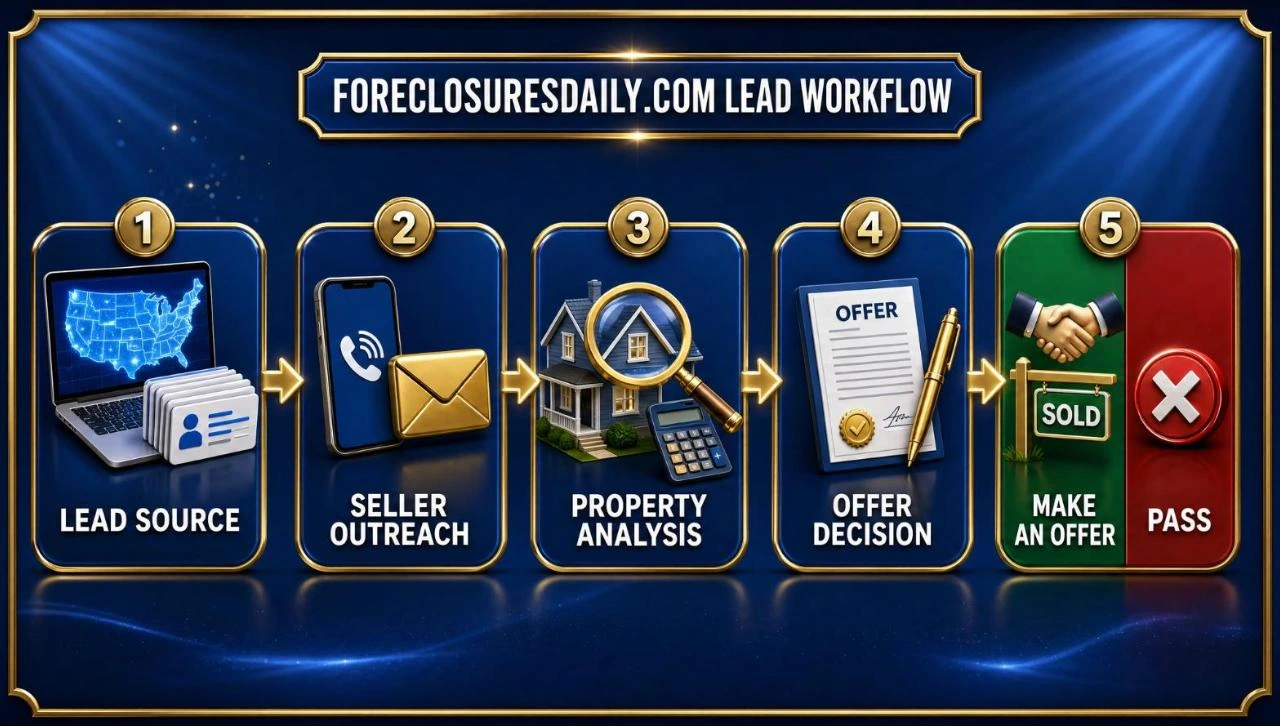
A simple data-quality test
Use a small, controlled test before judging the entire platform:
- Pull a narrow list from one county or ZIP code you understand well.
- Export or review a sample of records before spending on a large campaign.
- Check ownership details against county records or another trusted source.
- Call a sample manually to estimate right-party contact rate.
- Tag bad records by reason: wrong owner, wrong number, disconnected, duplicate, deceased owner, LLC mismatch, or already sold.
- Calculate usable records, not just total records, because usable data drives campaign economics.
This test is especially helpful when reading BatchLeads Reviews, as public reviews often do not specify the user’s list type, market, campaign method, or expectations.
CRM and pipeline management limitations
BatchLeads includes lead management features, but users seeking a comprehensive sales CRM should evaluate the platform carefully before replacing a dedicated CRM.
G2’s description mentions lead management tools, campaign actions, and exports to CRM or workflows, but that does not necessarily mean it has the same depth as a specialized CRM built around long-cycle sales teams, advanced automations, reporting, permissions, integrations, and complex pipelines.
This is where the keyword Limited CRM Features becomes relevant. For a solo wholesaler, a basic pipeline with tags, notes, follow-ups, and campaign history may be enough.
For a team managing acquisitions, dispositions, transaction coordination, lender communication, and repeat follow-up over many months, limited customization can become a constraint. The right question is not “Does BatchLeads have CRM features?” but “Are its CRM features enough for the way my team actually sells?”
If you already use a CRM such as Follow Up Boss, HubSpot, REsimpli, Salesforce, or another industry-specific system, BatchLeads may be a better fit as a prospecting and data layer.
In that setup, the platform helps you source and enrich leads, while your CRM remains the system of record for conversations, tasks, contracts, and revenue reporting. That division can prevent confusion when multiple team members work the same lead.
Outreach tools, compliance, and campaign execution
BatchLeads supports outreach workflows, including click-to-dial, direct mail, SMS-related features, and dialing support in some contexts. G2’s product discussion describes the ability to launch click-to-dial and direct-mail campaigns, and official materials reference a built-in dialer with AI prompts and property data available during calls.

For investors, this can be efficient. A user can move from “find properties” to “contact owners” without having to rebuild the campaign elsewhere.
In practical terms, that means fewer CSV files, fewer mapping errors, and less manual movement between tools. It also helps preserve context: a caller can view property information while speaking with an owner, rather than switching tabs during the conversation.
The caution is compliance. Calling and texting rules are serious, and any platform is only part of a compliant process.
BatchLeads’ SMS guideline materials reference items such as message disclosures, opt-out language, phone number reputation, and number management. Users should still consult legal guidance for TCPA, DNC, state-specific, and carrier rules before scaling outbound campaigns. A tool can provide features, but the user remains responsible for how campaigns are designed, approved, documented, and monitored.
Ready to start? Tell us which county you farm: Talk with our team about leads in your area →
Motivated Sellers in Who Want to Liquidate Fast
Each lead begins with a life event that gives the owner a reason to sell. Click any lead type to browse our products.







Pricing, refunds, and the “not worth the money” concern
Cost is one of the most common reasons users compare BatchLeads with other platforms.
Official materials describe plan-based lead and export limits, automatic billing after a trial period, and the ability to upgrade, downgrade, or request cancellation through account settings. The FAQ also states that month-to-month subscribers can cancel and avoid the following month’s charge, but that partial refunds are not offered for cancellation before the end of the current paid billing cycle.
Refund expectations deserve special attention.
A BatchLeads help-center article states that refunds are not offered because of the nature of the information and services provided, while the terms page says eligible refund requests must go to the billing team and are subject to evaluation and approval.
Those statements may feel strict to users who expected a flexible software refund policy. They also help explain why some BatchLeads complaints focus on cancellation timing, renewal confusion, or dissatisfaction after users have already paid.
This is the context behind search phrases such as not worth the money and “users complain about rising costs and strict refund policies.” Read that awkward search fragment as a warning to study billing terms before entering payment information.
A tool may be worth the cost for an active investor running consistent campaigns, but not for someone who logs in once, pulls an unfocused list, and lets the subscription renew.
Cost-fit checklist
Before subscribing, answer these questions in writing:
What do BatchLeads Reviews usually praise or criticize?
BatchLeads Reviews usually praise usability, list-building speed, integrated workflows, support, and the usefulness of contact data, while criticism tends to center on data accuracy, outdated data, billing expectations, refund limits, and whether the CRM is deep enough for advanced teams.
Trustpilot’s company profile describes BatchLeads as a platform for investors and related real estate professionals to generate leads, manage lists, find on- and off-market deals, and engage with property owners and agents; G2 review snippets show both favorable comments about accuracy and critical comments about outdated skip traces or fewer records than expected.
The reviews are not one-dimensional. Some users treat BatchLeads as a central part of their acquisition process.
Others feel the data-old problem is significant enough to reduce campaign efficiency. BBB complaint excerpts show disputes involving billing, cancellation, and refund expectations, although individual complaints should be read as specific cases rather than proof of every user’s experience.
A fair interpretation is that BatchLeads works best for users who understand both the power and the limits of aggregated real estate data.
If you expect a clean list of owners ready to sell, you’re likely to be disappointed. If you expect a research and outreach system that still requires testing, follow-up, and local judgment, the platform’s strengths become easier to evaluate.
BatchLeads compared with ForeclosuresDaily and AppFolio
Some users seek an alternative to ForeclosuresDaily because they want broader lead sources than foreclosure-only data provides.
BatchLeads can be considered an alternative in that broader sense because it supports multiple property filters, owner data, list building, skip tracing, and outreach workflows rather than focusing only on foreclosure monitoring.
However, if your entire strategy is built around foreclosure filings and legal-stage tracking, a specialized foreclosure platform may still be worth comparing on county coverage, update timing, and filing detail.

The search phrase “based on reviews appfolio property manager vs batchleads, something better?” needs a different answer.
AppFolio Property Manager is positioned as property management software for operators managing rentals, residents, maintenance, accounting, reporting, and portfolio workflows, while BatchLeads is positioned around property intelligence, lead generation, list management, skip tracing, and outreach. In most cases, they are not substitutes.
If you manage rental doors, AppFolio may be relevant to operations after you own or manage the property. If you are sourcing potential acquisitions, BatchLeads may be relevant before you own the property.
A landlord-investor could use both types of tools for different stages of the business. The better question is not which product is universally better, but which operational problem you are trying to solve.
Comparison by use case
| Use case | BatchLeads fit | AppFolio fit | ForeclosuresDaily.com fit |
|---|---|---|---|
| Use case | BatchLeads fit | AppFolio fit | ForeclosuresDaily.com fit |
| Finding off-market seller prospects | Weak fit | Weak fit | Stronger fit |
| Skip tracing property owners | Stronger fit | Weak fit | Varies by provider |
| Managing tenants and rent operations | Weak fit | Stronger fit | N/A |
| Tracking maintenance and resident communication | Weak fit | Stronger fit | N/A |
| Monitoring foreclosure opportunities | Possible fit | Weak fit | Stronger specialized fit |
| Running outbound campaigns | Stronger fit | Weak fit | Varies by provider |
Who is most likely to benefit
BatchLeads is most likely to benefit users who prospect actively and consistently.
That includes wholesalers building seller lists, investors seeking acquisition opportunities to manage, agents farming niche property segments, and service providers targeting owners based on property or investor characteristics. For these users, the value comes from speed, repeatability, and having data plus action tools in one place.
The platform may also suit small teams that want to reduce reliance on spreadsheets.
If every campaign currently requires manual exports, duplicate checks, skip-trace uploads, and separate campaign tools, a consolidated workflow can save time. Even then, the team should set standards for list naming, tagging, record ownership, and follow-up discipline. Without process, even a capable platform becomes another messy database.
BatchLeads may be a weaker fit for occasional users, buyers who only need a few addresses, teams that already have a mature CRM stack, or operators who require highly customized reporting and automation.
It may also frustrate users who are very sensitive to imperfect data. Every real estate data tool needs verification, but some users have less tolerance for cleaning records before outreach.
How to evaluate BatchLeads before committing
A thoughtful evaluation should be based on your market, strategy, and campaign math—not only on star ratings.
Reviews can highlight patterns, but they rarely indicate whether the reviewer used the same list type, budget, property class, and follow-up system you plan to use. That is why a short, structured test is more useful than reading dozens of disconnected opinions.
Start with one campaign goal. For example, choose absentee owners in two ZIP codes, vacant properties in one county, or cash buyers in a defined price range.
Pull the list, check a sample, run a small outreach sequence, and document the results. Track bad records, right-party contacts, interested conversations, appointments, offers, and actual costs.
Use this evaluation framework:
This approach turns subjective claims into measurable observations. It also protects you from overreacting to either enthusiastic BatchLeads Reviews or severe BatchLeads complaints.
A balanced takeaway from BatchLeads reviews
BatchLeads is less a real estate lead-generation tool and more a property-intelligence platform for users who need list building, skip tracing, property research, and outreach tools in a unified workflow.
Its strongest appeal is operational: it can reduce the number of tools and manual steps required to move from market research to owner contact. For active investors and teams with clear campaigns, that can be valuable.
The limitations are equally important.
Data can be imperfect; some users report outdated information, refund policies may feel too strict, and the built-in CRM may not meet the needs of teams that require advanced pipeline management. Those concerns do not automatically make BatchLeads a poor choice, but they do mean users should test carefully, read billing terms, and define success before subscribing.
If your business depends on consistent outbound prospecting, BatchLeads is worth evaluating with a focused trial and a real campaign sample.
If you need property management operations, a foreclosure-only feed, or a full-featured CRM, you may need something better suited to that specific job—or a separate system used alongside BatchLeads.
BatchLeads reviews: FAQ
What do BatchLeads reviews praise?
Users often praise usability, fast list building, integrated workflows, support and the usefulness of contact data.
What do BatchLeads complaints focus on?
Criticism usually centers on outdated skip traces, fewer records than expected, strict refund terms, cancellation timing and a CRM that may be too basic for larger teams.
Does BatchLeads offer refunds?
A BatchLeads help-center article says refunds are not offered because of the nature of the data, and its FAQ says partial refunds are not given for canceling mid-cycle. Month-to-month subscribers can cancel to avoid the next charge.
Can BatchLeads take the place of AppFolio?
Usually not. AppFolio manages rentals you already own or manage, while BatchLeads helps you find and contact owners before you buy.
 How should I test BatchLeads data?
Pull a small list in a market you know, check a sample against county records, call a sample to measure right-party contacts and count usable records rather than total records.
Related guides: Comprehensive Review of USLeadList Services, Comprehensive Tracerfy Review: Features and Benefits, DataFlik customer reviews.
Get Off-Market Leads Ahead of Your Competition
ForeclosuresDaily.com has helped investors in @@NOSTATE@@ and beyond reach motivated sellers first since 2004.